
NEXT Page - Android App Coding - res/layout/main.xml Tutorial
PREV Page
Goto - All Tutorials
PREV Page
Goto - All Tutorials
MainActivity.java Tutorial
This java file is created when you run your app project, and it tells the app where to find the particulars of your activity view - SetContentView tells the app to goto R.layout.main for the view's page styling and layout details; like its' layout type, font style, the margins on the view page, text color, text size, color of links, to name a few. The R.layout.main.xml file is discussed in the next tutorial.
If you use the 'template app' feature to create your app the
mainactivity.java file is created for you.
To locate this file in your android app project files goto:
AppProjects/nameOfApp/SRC/com/domainname/AppName/mainActivity.java
nameOfApp refers to name you gave app when creating it; domainname refers to your domainname also given when creating the appProject
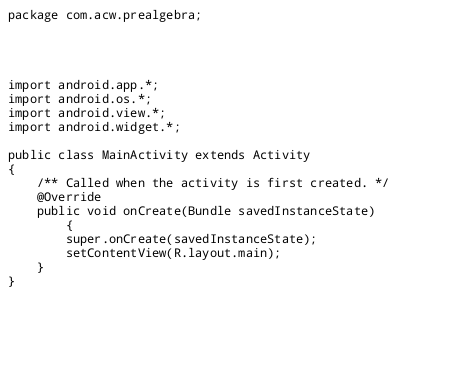

TO COPY CODE USE MOUSE
AIDE for creating Android Apps on your tablet or cell phone(android).
Free and Paid.
GoTo Aide
ANDROID STUDIO - for creating Android Apps on your desktop computer.
Free to Install and Use
Learn more - Android Studio
The Java XML files we code(example tutorial codes) and the Android Apps we create in our Free Tutorials are compatible with Android Studio and AIDE. Just choose Java XML as your Programming Language.
You May Like:
Make Sushi Rolls Taste World Wines Flavours and Aromas
This free script provided by
JavaScript
Kit
AIDE for creating Android Apps on your tablet or cell phone(android).
Free and Paid.
GoTo Aide
ANDROID STUDIO - for creating Android Apps on your desktop computer.
Free to Install and Use
Learn more - Android Studio
The Java XML files we code(example tutorial codes) and the Android Apps we create in our Free Tutorials are compatible with Android Studio and AIDE. Just choose Java XML as your Programming Language.
You May Like:
Make Sushi Rolls Taste World Wines Flavours and Aromas